

Minecraft Bedrock addons can add new mobs, weapons, blocks, recipes, structures, biomes, bosses, vehicles, and gameplay systems to Minecraft Bedrock Edition. You can find them through Minecraft Marketplace or download free community-made projects from platforms such as CurseForge and MCPEDL.
The installation process is simple on Windows, Android, and iOS. Console players have fewer options for third-party addons, but they can use Marketplace content or access an addon-enabled world through Realms.
Before downloading anything, check the addon’s supported Minecraft version. A project that worked in an older release may show missing textures, fail to load, or cause crashes after a game update.
Best Minecraft Bedrock addons to try
The right addon depends on the type of Minecraft experience you want. The projects below cover survival expansions, automation, weapons, dragons, and physics-based gameplay.
| Addon | Best for | What it adds | Important compatibility note |
| Better on Bedrock | Vanilla-style survival | New biomes, items, mobs, structures, and progression | The project page lists specific supported versions |
| Bedrock Reimagined | Large survival overhaul | Mobs, bosses, structures, magic, animations, and progression | Check the latest release before installing |
| UtilityCraft | Automation | Machines, generators, spawners, bonsais, fluids, and tools | Better suited to players who want a technology system |
| RPG++ | RPG survival | Dungeons, bosses, magic, and RPG mechanics | Check whether the current release requires a new world |
| Phoenix’s Tools & Weapons | New gear | Tools, weapons, armor, and survival equipment | The page lists supported Bedrock versions |
| ACT WEAPONARY | Guns and combat | Firearms, ammunition, recoil, reloads, and combat mechanics | A newer project with limited download history |
| TerraDraconis Core | Dragons and fantasy | Fantasy systems and the core components of the TerraDraconis series | Check the creator’s required companion addons |
| Physics Glue Create | Realistic physics and machines | Movable block structures, vehicles, boats, and flying machines | The project is marked as beta |
| RR Gravity Staff | Physics effects | Gravity manipulation, telekinesis, particles, and custom effects | Requires Beta APIs in World Settings |
This list is not a claim that one addon is objectively the best for everyone. It is organized by playstyle so you can choose a project that matches the world you want to create.
What are Minecraft Bedrock addons?
Minecraft Bedrock addons are custom content packages that modify Minecraft Bedrock Edition. They can change how existing mobs behave, add new items and blocks, or introduce systems that are not included in the standard game.
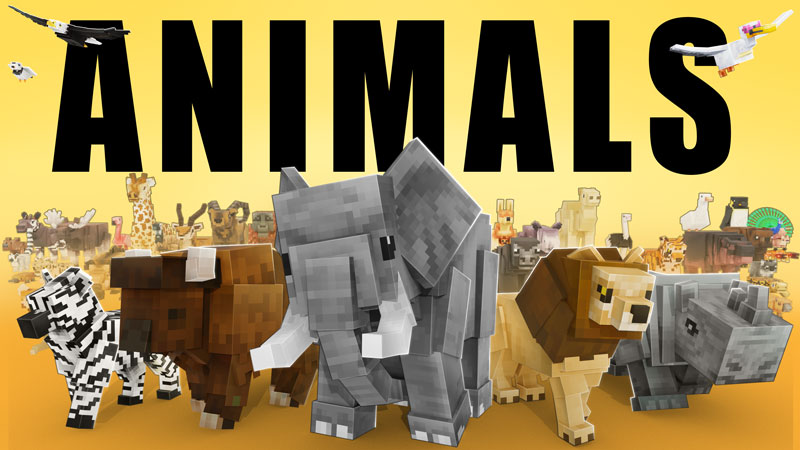
Depending on the project, an addon may add:
- New mobs, animals, dragons, or bosses
- Guns, swords, armor, and tools
- Custom blocks and building materials
- Crafting recipes and progression systems
- Dungeons and structures
- Biomes and world-generation features
- Vehicles and machines
- New sounds, textures, animations, and particles
- Changes to mob behavior, loot, or spawning
Minecraft officially describes Add-Ons as a way to customize the appearance and behavior of worlds. (Minecraft Creator Tutorials)
Addons vs. mods in Minecraft Java
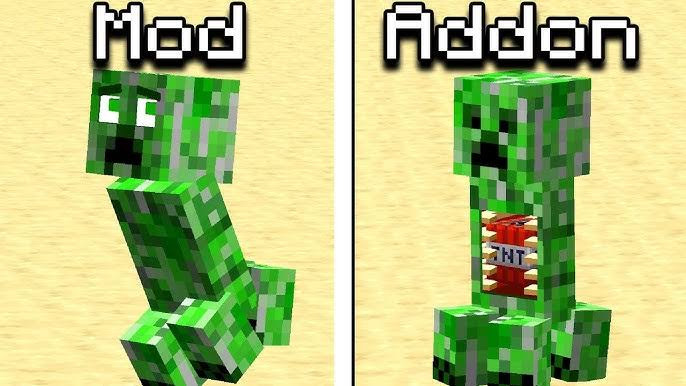
Bedrock addons and Java mods use different systems.
Java Edition mods commonly require a mod loader such as Forge or Fabric. Bedrock Edition uses resource packs, behavior packs, and the Bedrock scripting system.
You cannot download a Java mod and install it directly into Minecraft Bedrock. Some websites use the phrase “Bedrock mods,” but the actual download may be an addon, resource pack, behavior pack, or map.
Resource packs and behavior packs
A Bedrock addon may contain one pack or several connected packs.
| Pack type | Main function |
| Resource pack | Changes textures, models, sounds, animations, particles, or visual effects |
| Behavior pack | Changes mob behavior, loot, recipes, spawning, trades, and gameplay rules |
| Addon | A project that may include both resource and behavior packs |
| World or map | A complete world that may already contain custom content |
For example, a custom dragon addon may need a behavior pack to control the dragon’s abilities and a resource pack to display its model and animations. Microsoft’s documentation explains that custom entities commonly use both types of packs. (Creating new entity types)
Where to download Minecraft Bedrock addons
You can download Minecraft Bedrock addons from the official Marketplace or community platforms such as CurseForge and MCPEDL.
Minecraft Marketplace
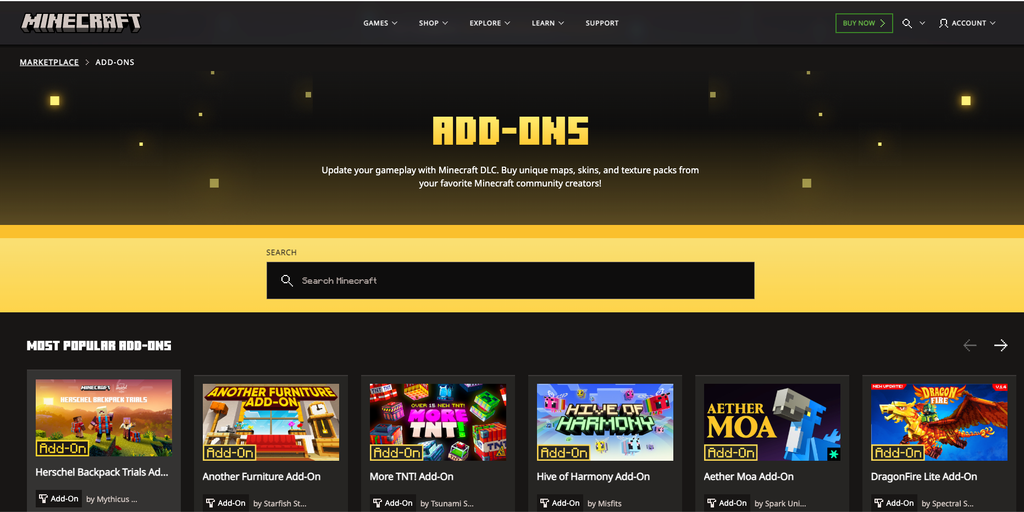
Minecraft Marketplace is the official option inside Minecraft. It includes free and paid content made by creators and is the simplest choice for console players.
Marketplace addons can add:
- Custom mobs
- Blocks and items
- Recipes
- Gameplay systems
- Maps and adventure content
- Texture and visual changes
Some content requires Minecoins or a Marketplace Pass. Unlike many third-party downloads, Marketplace content does not usually require you to manually import files or manage pack folders. (Minecraft Marketplace Add-Ons)
CurseForge
CurseForge has a large collection of Minecraft Bedrock addons. You can browse by category, game version, popularity, and content type.
Before downloading from CurseForge, check:
- Supported Minecraft versions
- Latest release date
- Project description
- Changelog
- Required dependencies
- Resource pack and behavior pack requirements
- Comments from players using the same game version
CurseForge organizes Bedrock content into categories such as Survival, Horror, Magic, Performance, Multiplayer, Mobs, and Armor, Tools, and Weapons. (CurseForge Minecraft Bedrock addons)
MCPEDL
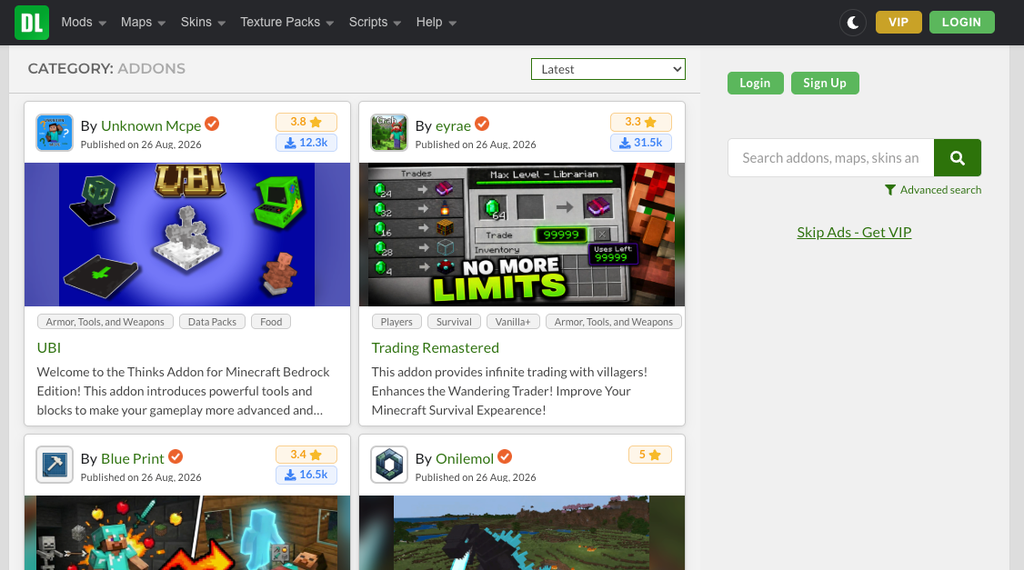
MCPEDL is a large community platform for Minecraft Bedrock addons, maps, skins, and texture packs. It includes categories for mobs, utility, survival, tools, weapons, vehicles, horror, and more.
MCPEDL is useful for discovering new projects, but you should pay attention while downloading. Use the download link connected to the actual addon page and avoid fake buttons, unrelated pop-ups, or files that ask you to install another application.
MCPEDL also provides installation instructions for Android, iOS, and Windows. (MCPEDL addons)
Websites to avoid
Do not download an addon if the website:
- Requires an unrelated APK or EXE file
- Requests your phone number before downloading
- Provides a .bat, .scr, or suspicious executable file
- Does not identify the creator
- Has no supported version or changelog
- Re-uploads content without attribution
- Redirects you through several unrelated download pages
A normal Bedrock addon may use a file such as .mcpack or .mcaddon. You should not need to install a random program to import one.
How to choose the right Bedrock addon
A high download count does not guarantee that an addon will work with your version of Minecraft. Use the following checks before adding one to your world.
Check Minecraft version compatibility
First, check the Minecraft version installed on your device. Then compare it with the version listed on the addon page.
Look for:
- Supported Minecraft versions
- Date of the latest update
- Recent changelog entries
- Comments from players using the same version
- Experimental feature requirements
- Known conflicts with other addons
For example, Better on Bedrock has millions of downloads, but its CurseForge page lists specific game versions. That means popularity alone is not enough to confirm compatibility. (Better on Bedrock)
Check whether it needs experimental features
Some addons require experimental features in the world settings.
If the creator lists experiments as a requirement:
- Duplicate or back up your world.
- Create a test copy.
- Enable only the required settings.
- Test the addon before using it in your main world.
RR Gravity Staff, for example, requires Beta APIs to be enabled before its custom physics features work. (RR Gravity Staff)
Check achievements and multiplayer support
Do not assume every addon preserves achievements. Some addons or world settings may affect them depending on how they change gameplay.
You should also check multiplayer support. An addon may work in single-player but create problems on a Realm or server. Multiplayer behaviour varies by addon and hosting method. On Realms, players connecting from supported Bedrock devices can automatically download Add-Ons activated on the Realm.
Check whether you need a new world
Addons that change terrain generation, biomes, structures, or progression often work best in a new world.
An addon may install correctly in an existing world but fail to generate new structures in areas that have already been explored. If the creator recommends a new world, follow that instruction.
How to install Minecraft Bedrock addons
The general process is to download the correct file, open it with Minecraft, and activate the imported packs in a world.
How to install Minecraft Bedrock addons on Windows
- Download the .mcpack or .mcaddon file from the addon’s official page.
- Open the downloaded file.
- Allow Minecraft to import the pack.
- Wait until the import notification appears.
- Select Play and create a new world or edit a test world.
- Open Resource Packs and Behavior Packs.
- Activate every pack included with the addon.
- Enable experimental features only if required.
- Enter the world and test the addon.
A .mcpack file may appear under either the Resource Packs or Behavior Packs section, depending on the type of content it contains. (Microsoft Learn: Getting started with Add-Ons)
Advanced users can access the com.mojang development folders, but most players do not need to manually edit these folders when importing a correctly packaged addon.
%appdata%\Minecraft Bedrock\users\shared\games\com.mojang
How to install Minecraft Bedrock addons on Android
- Download the addon to your phone.
- Open the downloaded addon file from your Downloads folder or file manager.
- Tap the .mcpack or .mcaddon file.
- Choose Minecraft when Android asks which app should open it.
- Wait for Minecraft to import the addon.
- Open the world settings.
- Activate the required resource and behavior packs.
- Test the addon in a new or copied world.
If the download is a ZIP archive, read the creator’s instructions before renaming or extracting it. Some ZIP files contain several separate packs and should not be treated as one .mcpack file.
How to install Minecraft Bedrock addons on iPhone or iPad
- Download the addon through Safari or another supported app.
- Open the Files app.
- Go to the Downloads folder.
- Tap the addon file.
- Choose Share or Open in Minecraft.
- Wait for the import to finish.
- Open Minecraft’s world settings.
- Activate the required packs.
Microsoft states that iOS users can open an addon from a download, URL, or email attachment when the file is associated with Minecraft. (Microsoft Learn: Add-On installation)
How to install third-party addons on Xbox, PlayStation, or Nintendo Switch
Installing a third-party addon directly on a console is not as simple as opening a file on Windows or mobile.
The easiest option is Minecraft Marketplace. For some third-party addons, Microsoft’s documented method requires:
- A Windows PC with Minecraft Bedrock Edition
- A Minecraft Realm subscription
- A world with the addon already activated
- Uploading that world to the Realm
- Opening the addon-enabled world from the console
This does not guarantee that every addon will work perfectly on every console. The addon still needs to support the current Bedrock version and multiplayer environment. (Microsoft Learn: Realms and console installation)
How to activate an addon in an existing world
Before activating an addon in a world you care about:
- Create a backup or duplicate of the world.
- Select Edit beside the world.
- Open Resource Packs.
- Open Behavior Packs.
- Activate every pack required by the addon.
- Adjust the pack order if the creator provides one.
- Enable required experimental features.
- Enter the world and test the addon.
This is particularly important for addons that change terrain generation, mobs, world rules, or recipes.
Best Minecraft Bedrock addons by category
Best survival expansion addons
Survival expansion addons add new progression systems, mobs, structures, biomes, items, or challenges.
Better on Bedrock is designed as a vanilla-style expansion with new content while keeping the basic Minecraft feel. It is a good choice for players who want more to explore without completely replacing survival gameplay.
Bedrock Reimagined is a larger overhaul with new mobs, bosses, structures, magic systems, custom animations, and progression. It is better suited to players who want a more substantial change.
Bedrock’s Better Adventures adds biomes, civilizations, structures, animals, and new challenges. It focuses more on exploration and world variety.
RPG++ adds RPG-style content such as dungeons, bosses, magic, and new survival mechanics.
Large expansion addons may work best in a new world. Check the creator’s instructions before adding them to an established save.
Best utility and quality-of-life addons
Utility addons improve everyday survival without necessarily replacing Minecraft’s entire progression system.
Common types include:
- Vein miner addons
- Tree capitator addons
- Gravestone addons
- Inventory management addons
- Dynamic lighting addons
- Uncrafting addons
- Storage and sorting addons
UtilityCraft takes the idea further by adding machines, generators, spawners, bonsais, fluid systems, and tools for automation. It is a better fit for players who want a technology-focused survival world rather than a small quality-of-life change. (UtilityCraft)
Best Minecraft Bedrock gun addons
Minecraft Bedrock gun addons usually add firearms, ammunition, reload systems, custom animations, sounds, and combat mechanics.
They work well for:
- PvP arenas
- Zombie survival maps
- Military roleplay
- Custom adventure worlds
- Multiplayer combat
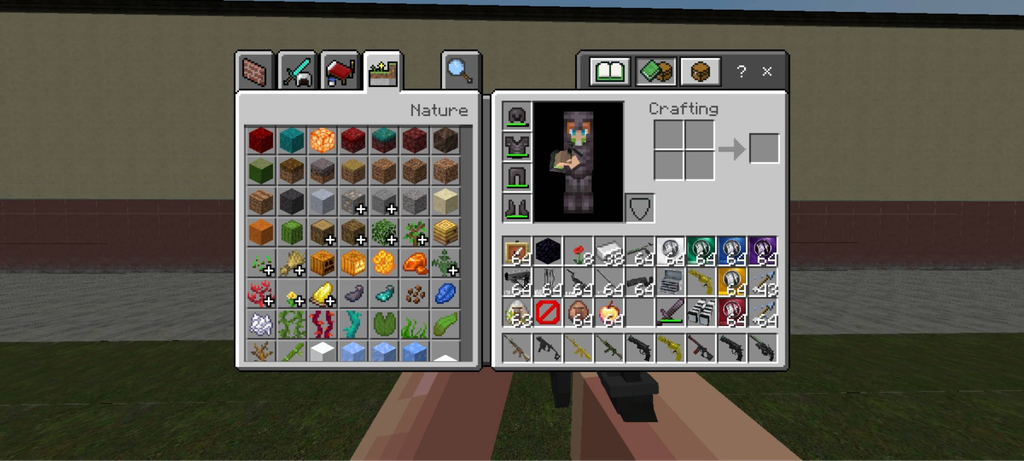
ACT Weaponary is a newer firearms project that adds guns, ammunition, recoil, reload logic, and combat movement. Because it is relatively new, check recent comments and supported versions before using it in a long-term Realm. (ACT Weaponary)
Before downloading any Minecraft Bedrock gun addon, check:
- Whether weapons work in survival mode
- How ammunition is crafted
- Whether multiplayer is supported
- Whether experiments are required
- Whether it conflicts with another weapon addon
- Whether the download includes both resource and behavior packs
Do not expect every gun addon to work like a Java mod or a standalone shooter. Controls, animations, and balancing vary between projects.
Best Minecraft Bedrock dragon addons
Minecraft Bedrock dragon addons can range from simple reskins to complete fantasy systems.
TerraDraconis Core is designed around dragons, creatures, systems, and a fantasy-themed world. The series may include companion projects, so read the creator’s instructions before downloading only one part. (TerraDraconis Core)
Check whether a dragon addon includes:
- New dragon entities
- Taming or breeding
- Rideable dragons
- Dragon abilities
- Custom armor
- Boss fights
- New structures or dimensions
- Survival recipes
- Custom animations
A project that only changes the appearance of an existing mob will play very differently from one that adds a complete dragon progression system.
Best Minecraft Bedrock realistic physics addons
The phrase “realistic physics” can describe several different types of content. Some addons focus on falling objects, movable structures, ragdoll effects, particles, lighting, or more realistic movement.
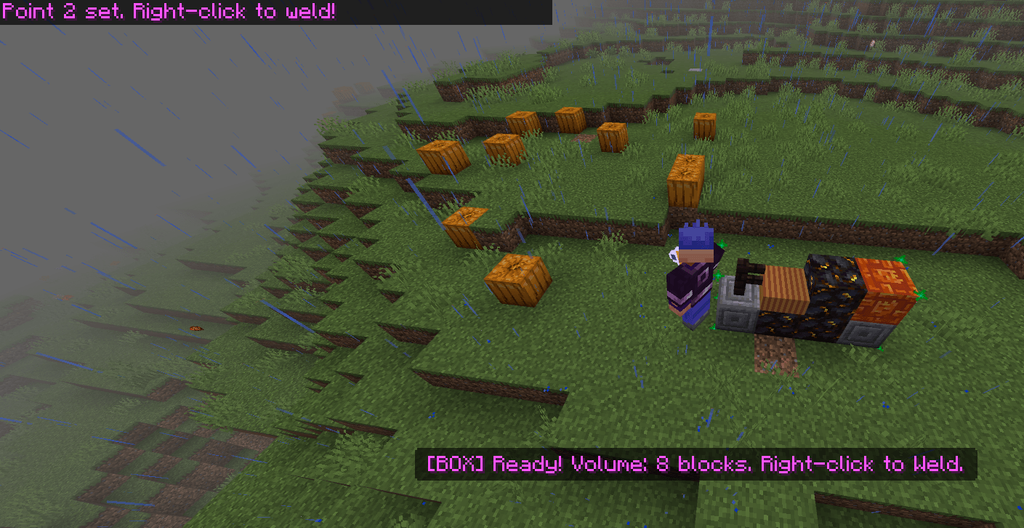
Physics Glue Create lets players connect standard blocks into movable structures such as cars, boats, and flying machines. It is closer to a physics and engineering addon than a visual realism pack. (Physics Glue Create)
RR Gravity Staff focuses on gravity manipulation, telekinesis, particles, and custom effects. It requires Beta APIs, so it should be tested in a separate world before being added to a main save. (RR Gravity Staff)
A realistic texture pack may improve visual detail but add no physics. Always read the description to see exactly what the project changes.
Physics effects, custom animations, high-resolution textures, and large particle systems can also reduce performance on older phones, tablets, and consoles.
How to make Minecraft Bedrock addons
You can make simple Minecraft Bedrock addons with JSON files and the correct pack structure. You do not need to begin with a massive dragon or firearms system.
What you need
For a beginner project, you need:
- Minecraft Bedrock Edition
- A Windows computer
- Visual Studio Code or another JSON editor
- A resource pack or behavior pack folder
- Basic knowledge of JSON
- A separate test world
Microsoft’s creator documentation covers resource packs, behavior packs, development folders, JSON files, and Visual Studio Code extensions. (Getting started with Bedrock Add-On development)
Beginner addon projects
Good first projects include:
- Changing a mob’s behavior
- Adding a simple recipe
- Creating a custom item
- Replacing an item texture
- Changing a loot table
- Adding a basic custom block
A behavior pack controls gameplay data such as entity behavior, recipes, loot, spawn rules, and trades. A resource pack controls visual and audio assets.
A practical learning path
- Learn how resource packs are structured.
- Learn how behavior packs are structured.
- Create a simple item or recipe.
- Test the addon in a separate world.
- Add a custom texture.
- Learn about entities and animations.
- Explore the Bedrock scripting API.
- Package the finished project as an importable addon.
Minecraft Bedrock addon troubleshooting
The addon does not appear in Minecraft
Try these solutions:
- Open the file again.
- Confirm that Minecraft is updated.
- Check the Resource Packs and Behavior Packs menus.
- Make sure the file is not still inside a ZIP archive.
- Download the correct version from the creator’s page.
- Check whether the pack was imported into the correct Minecraft installation.
The addon appears but does not work
The most common reasons are:
- Only the resource pack was activated.
- Only the behavior pack was activated.
- Required experiments are disabled.
- The addon needs a specific item, command, or spawn egg.
- The world was created before the addon was installed.
- Another addon is overriding the same files.
Try the addon in a new test world with no other packs active. If it works there, another addon or an existing world setting is probably causing the problem.
Minecraft crashes or gets stuck loading
If Minecraft becomes stuck on the resource loading screen:
- Close the game completely.
- Open a backup or copy of the world.
- Disable the newest addon.
- Test the world again.
- Disable other addons one at a time.
- Remove the addon causing the conflict.
- Install a compatible version.
Avoid adding several large expansion addons to the same world before testing them individually.
Textures, items, or mobs are missing
Missing textures usually indicate that:
- The resource pack is not activated.
- The behavior pack and resource pack are from different versions.
- The pack order is incorrect.
- Another addon is replacing the same texture.
- The creator has not updated the visual files for the current game version.
Check the download page to see whether the creator provides separate resource and behavior pack files.
Can you use multiple Bedrock addons at once?
Yes, but compatibility depends on what each addon changes.
Two small utility addons may work together without problems. Two addons that both modify villagers, weapons, recipes, mobs, or world generation can conflict with each other.
Add one addon at a time, test it, and keep a backup before adding the next one.
Minecraft Bedrock addons FAQs
Are Minecraft Bedrock addons free?
Many community addons on CurseForge and MCPEDL are free. Minecraft Marketplace includes both free and paid content, with some addons requiring Minecoins.
Are Minecraft Bedrock addons safe?
They can be safe when downloaded from a reputable platform and the creator’s official page. Avoid executable files, suspicious APKs, fake download buttons, and re-uploaded files from unknown websites. Always back up your world before installing an addon.
Can you install Bedrock addons on Xbox or PlayStation?
Marketplace addons can be installed directly through Minecraft. Third-party addons generally require a Windows Bedrock installation and, in some cases, a Realm to transfer an addon-enabled world to a console.
Do Bedrock addons work on every Minecraft version?
No. An addon may only support specific Minecraft versions. Check the project page, changelog, and recent comments before downloading it.
Do Bedrock addons work on Minecraft Java Edition?
No. Bedrock addons are not directly compatible with Java Edition mods. The two editions use different content and modding systems.
Do Minecraft Bedrock addons disable achievements?
Some addons or world settings may affect achievements, but this is not true for every addon. Check the creator’s description and test the addon in a separate world if achievements are important to you.
Can you use Minecraft Bedrock addons in multiplayer?
Many addons work in multiplayer, but support depends on the addon, Realm, server, and game version. Some addons require every player to download the same packs, while others work mainly on the host’s world.
Conclusion
Minecraft Bedrock addons are a practical way to add new mobs, weapons, blocks, recipes, structures, and gameplay systems to Bedrock Edition. For the safest experience, start with Minecraft Marketplace. For community-made addons, use established platforms such as CurseForge or MCPEDL and verify the creator, file type, supported version, and download source.
Start with a backup world, activate all required resource and behavior packs, and test one addon at a time. Whether you want Minecraft Bedrock gun addons, dragon addons, realistic physics addons, or a larger survival expansion, compatibility matters more than download count.