
The Minecraft Bedrock vs Java decision mostly comes down to two questions: what devices do you use, and who do you want to play with? Choose Bedrock Edition for crossplay between Windows, consoles and mobile devices. Choose Java Edition for deeper modding, custom servers and greater control over how you play.
Windows players have an easier choice because Minecraft: Java & Bedrock Edition for PC includes both editions. You can install each one and switch depending on the world or server you want to join.
On other platforms, the decision is made for you. Java runs on Windows, macOS and Linux. Bedrock is available on Windows, Xbox, PlayStation, Nintendo Switch, compatible Chromebooks, Android and iOS.
Minecraft Bedrock vs Java: What is the main difference?
Both editions contain the Minecraft experience most people expect: Survival and Creative modes, the Overworld, Nether and End, regular content updates and multiplayer.
The difference is how they are built and where they are designed to work.
Java Edition prioritizes flexibility. Its community has built a huge ecosystem of mods, custom launchers, data packs, technical farms and independently operated servers.
Bedrock Edition prioritizes accessibility. It supports more devices, built-in cross-platform multiplayer, controllers, touch controls, console split-screen and the Minecraft Marketplace.
Neither is a reduced version of Minecraft. They simply suit different types of players. Our Bedrock Minecraft guide covers the Bedrock ecosystem in more detail if that is the edition available on your device.
Can Java and Bedrock players play together?
Java and Bedrock players cannot normally join the same world, Realm or server.
Java players can play with other Java users on Windows, macOS and Linux. Bedrock players can join one another across supported consoles, Windows PCs, Chromebooks and mobile devices.
This is usually the deciding factor. If your friends play on Xbox, PlayStation, Switch or phones, choose Bedrock. If they use a Java server or modpack, choose Java.
Some community servers use bridging software to accept connections from both editions. This is an unofficial server-specific solution, not standard Java and Bedrock crossplay. Differences in movement, combat and game mechanics can also affect the experience.
Java Edition 26.2 added a built-in Friends List, allowing players to send friend requests and see when friends are online. It does not let Java players join Bedrock worlds, and Mojang removed the tested peer-to-peer world hosting feature before release.
Java mods vs Bedrock add-ons
Java is the better edition for extensive modding.
Java mods can add dimensions, machines, creatures, progression systems and major performance improvements. Some modpacks change Minecraft so dramatically that they feel like separate games. Java also lets players use an older game version when a favorite modpack has not been updated.
The downside is that mods require more setup. You must check the Minecraft version, mod loader, dependencies and compatibility between installed files.
Bedrock uses add-ons, resource packs and behavior packs. Add-ons can introduce blocks, items, mobs, recipes and new gameplay mechanics without requiring the same kind of mod loader used by Java.
They are generally easier to install, especially through the Marketplace. This makes them convenient for console and mobile players, although the system does not offer the same freedom as Java modding.
Not every Bedrock add-on costs money. Free community add-ons exist, while the Marketplace offers a more controlled installation process across supported devices.
Java mods cannot be installed directly in Bedrock. If you want a smaller themed Java experience, our Matcha Flavored Minecraft guide explains what that mod changes and how to start using it.
Is Bedrock faster than Java?
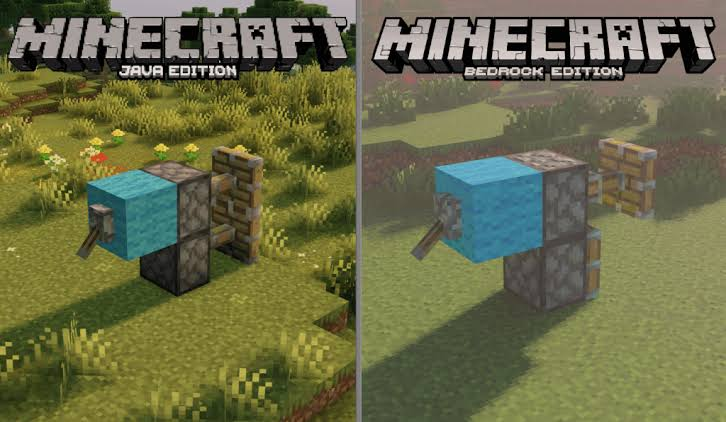
Bedrock will often run more smoothly without additional setup, particularly on modest hardware. It was built to support devices ranging from gaming PCs to phones and consoles, so its default experience is usually more consistent.
That does not mean Bedrock always has a higher frame rate. Performance depends on the device, world size, render distance, add-ons and the number of active entities.
Java can be more demanding, but players have greater freedom to adjust settings and install performance mods. A well-configured Java installation can run extremely well on a suitable PC.
Mojang has also updated the Java Edition system requirements. Anyone using an older computer should check the current requirements instead of relying on recommendations written for earlier versions.
For a weaker Windows PC, try Bedrock first. On a capable gaming PC, performance should not be the only reason to choose one edition.
Which edition has better graphics?
Java offers more visual customization. Community shaders can change lighting, shadows, water, clouds and atmosphere. The results can be impressive, but shaders may require extra setup and powerful hardware.
Bedrock offers a more integrated option through Vibrant Visuals, Minecraft’s official graphical refresh for compatible Bedrock devices. Availability and settings depend on the platform and hardware.
Mojang is working toward bringing Vibrant Visuals to Java, but Java’s established shader ecosystem remains the more flexible option. Choose Java if you enjoy experimenting with graphics. Choose Bedrock if you prefer supported visual improvements that require less manual configuration.
Redstone and farms work differently
A redstone machine made for one edition may fail in the other because Java and Bedrock process pistons, block updates and certain redstone events differently.
This affects doors, flying machines, item sorters and automatic farms. Even mob and iron farm designs may depend on edition-specific spawning rules.
Always include your edition when searching for a Minecraft tutorial. A design labeled for Java should not be assumed to work in Bedrock, and vice versa.
Java is popular with technical players because its mechanics have been documented extensively and many high-output farms are designed around them. Bedrock still supports complex automation, but you need a design created and tested for Bedrock.
Combat feels different
Java rewards timed attacks. Weapons have an attack cooldown, so repeatedly clicking is usually less effective than waiting for the attack indicator to recharge.
Bedrock combat is faster and makes rapid attacks more useful. Shields, knockback and other combat details can also feel different when switching editions.
For normal Survival play, most players will adapt quickly. For competitive multiplayer, choose the edition used by the server or combat community you want to join.
Bedrock is better for controllers and split-screen
Bedrock includes native controller support on relevant platforms and touch controls on mobile devices. Its interface adapts to the selected input method, making it more comfortable on consoles, handheld devices and phones.
Java is primarily designed for keyboard and mouse. Controller play is possible through mods or external configuration, but it is not built into the edition in the same way.
Supported Bedrock consoles also provide local split-screen multiplayer. Java does not include native split-screen, so Bedrock is the clear choice for straightforward couch co-op.
Servers and Realms
Java has a large server ecosystem covering Survival multiplayer, minigames, role-playing, technical play and heavily customized experiences. Server owners can use plugins and custom settings to change gameplay without requiring every player to install a full modpack.
Bedrock also supports online worlds, servers and Realms. Its advantage is convenience: friends using different supported devices can enter the same Bedrock world through their Microsoft accounts.
Console players may have fewer options for adding custom servers because access depends on the platform. Windows and mobile Bedrock players generally have more flexibility.
Realms are private Mojang-hosted servers intended for players who want an always-available world without managing server software. Java Realms and Bedrock Realms are separate, so subscribing to a Realm does not remove the boundary between editions.
Does Bedrock have Hardcore mode?
Yes. Hardcore is available in both Java and Bedrock, so it is no longer a Java-exclusive feature.
Hardcore locks the world to its highest Survival difficulty and removes normal respawning after death. Because one mistake can end the run, back up any important world before testing experimental content or conversion tools.
Can you transfer a Java world to Bedrock?
Minecraft does not include a normal one-click tool for converting worlds between Java and Bedrock.
Third-party tools can sometimes convert them, but blocks, entities, inventories, commands and redstone builds may not transfer correctly. Always duplicate the original world before attempting a conversion.
Do purchases carry between Java and Bedrock?
The Windows PC bundle includes both base editions, but their additional content is not interchangeable.
Java mods and resource packs do not become Bedrock Marketplace purchases. Bedrock Marketplace content does not become Java content. Buying the PC version also does not automatically give you Minecraft on Xbox, PlayStation, Switch, Android or iOS.
Which edition is better for you?
Choose Bedrock if you need console and mobile crossplay, native controller support or split-screen. Choose Java if you care more about mods, custom servers, technical Minecraft or access to older versions.
For Windows players, owning both removes most of the pressure from the Minecraft Bedrock vs Java choice. Use Bedrock when playing with a mixed-device group, and launch Java when you want the freedom of its larger modding and server community.