




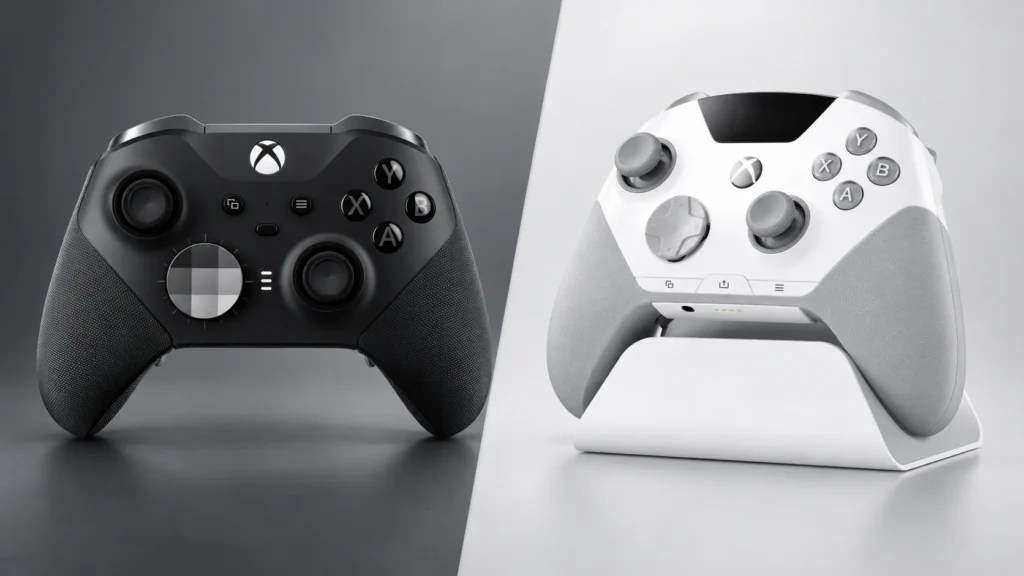
The SteelSeries Aeon Pro vs Xbox Elite Series 2 comparison comes down to one practical question: do you regularly move between a PC and an Xbox in the same setup? If you do, the Aeon Pro’s dual-input dock, swappable batteries, and onboard screen solve annoyances the Elite cannot. If you mainly use one system, the less expensive Elite Series 2 is the more sensible buy, with longer battery life per charge, adjustable stick tension, and removable paddles.
This is a specification-led buying guide, not a hands-on review. The comparison uses official product information and attributes subjective observations to publications that tested the hardware.
SteelSeries Aeon Pro vs Xbox Elite Series 2 specifications
| Feature | SteelSeries Aeon Pro | Xbox Elite Series 2 |
|---|---|---|
| US list price | $259.99 | $199.99 for the complete package |
| Main platforms | Xbox, Windows PC, compatible Bluetooth devices | Xbox, Windows PC, compatible Android and iOS devices |
| Device switching | QuickSwitch dock connects to a PC and Xbox simultaneously | Xbox Wireless, Bluetooth, or USB-C; no dual-input dock |
| Battery | Two removable, hot-swappable batteries | Internal rechargeable battery |
| Stated or reported runtime | About 12 hours per battery, according to launch coverage | Up to 40 hours per charge; varies with use |
| Thumbsticks | Hall-effect sensors; interchangeable caps | Three tension settings; interchangeable caps |
| Triggers | Hall-effect triggers; full-travel or hair-trigger modes | Adjustable triggers with three-step hair trigger locks |
| Rear controls | Four fixed, remappable rear buttons | Four removable, remappable paddles |
| Face and input switches | 18 mechanical switches | No equivalent all-mechanical claim |
| Profiles and settings | Controller-mounted OLED plus SteelSeries GG on PC | Three custom profiles plus one default; Xbox Accessories app |
| Charging dock | Included; also handles PC/Xbox connections and charges a spare battery | Included with the complete model; charges the controller |
| Carrying case | Not included | Included with the complete model |
US list prices and product information checked on September 11, 2026. Retail discounts can change the price gap.
Prices often change after launch, so check Amazon for the latest availability and current offers before choosing.
The $60 question is whether you will use the dock
The Aeon Pro launched at $259.99. The complete Elite Series 2 has a $199.99 recommended US price following Microsoft’s 2025 Xbox price adjustment. At list price, SteelSeries is asking for an extra $60.
That comparison must use the complete Elite package. The cheaper Elite Series 2 Core uses the same controller design but does not include the four paddles, extra thumbsticks, charging dock, or carrying case. Comparing the Aeon bundle with a Core controller while crediting it with the full model’s accessories would make the Xbox option look cheaper than it really is.
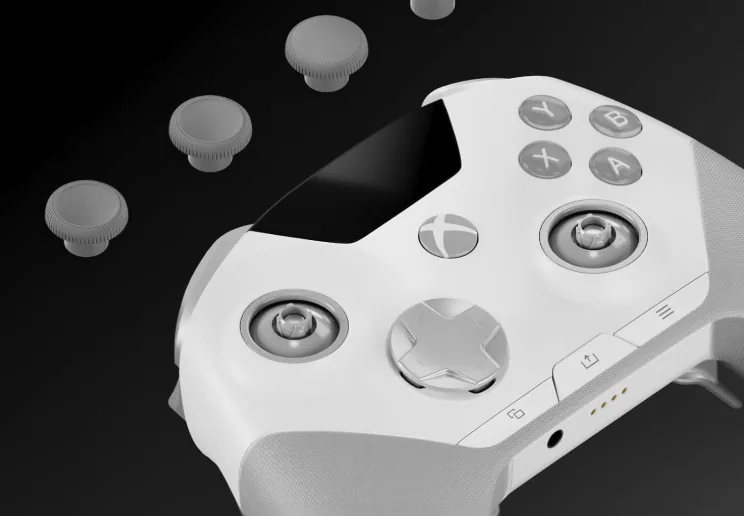
SteelSeries puts much of its budget into a more ambitious dock. Separate USB connections can remain attached to a PC and Xbox, and the controller can change source without moving a cable or beginning another pairing process. The dock also charges the spare battery and stores alternative stick caps. The Elite dock is primarily a charging base.
This makes the premium easy to judge. If an Xbox and PC sit at the same desk and you alternate between them several times a week, QuickSwitch removes a small but recurring hassle. If the second input will stay empty, much of the Aeon’s most distinctive hardware has no job to do.
QuickSwitch works best in one gaming space
SteelSeries markets the Aeon Pro as the world’s first controller built around a QuickSwitch Dock System for Xbox and PC. The narrower wording matters. It is not the first premium controller to support both platforms; the new part is the dock-based connection workflow.
In a compact setup, it is useful. A player can finish a PC game, select the Xbox connection from the controller, and continue on the console without reaching behind either machine. Automatic source detection is available, while the OLED provides a manual choice when both systems are active.
Distance is the catch. Both devices need a wired path to the dock. In Forbes’ early testing, a PC and Xbox placed roughly six meters apart made an extension cable necessary. Systems in different rooms weaken the feature further, because a long cable or a relocated dock replaces the convenience QuickSwitch was meant to create.
The Elite Series 2 still switches among supported devices through Xbox Wireless, Bluetooth, or USB-C. It simply does not keep a PC and Xbox linked through one dedicated base. For a single screen or a conventional console setup, that distinction may barely affect a session. For two nearby systems used equally, QuickSwitch is the clearest reason to choose SteelSeries.
SteelSeries’ product video shows the Aeon Pro dock moving between a nearby Xbox and PC without shifting cables or starting a new pairing process.
Battery design favors different routines
The Aeon Pro includes two removable batteries. One powers the controller while the other charges in the dock, so a depleted pack can be exchanged for a ready one. Launch coverage from The Verge reports roughly 12 hours from each battery. This is not a 24-hour internal battery: continuing play requires a brief swap, and the system works as intended only when the spare has been left to charge.
Microsoft’s maximum estimate for the Elite Series 2 is 40 hours, with actual runtime varying by usage and accessories. Its internal cell requires the whole controller to recharge, but it asks for attention less often. It can also be played through the included USB-C cable if the battery runs low.
The better design depends on habit. SteelSeries suits someone who wants to avoid plugging in the controller during a session and is comfortable rotating packs. The Elite suits someone who would rather charge one device occasionally and forget about battery management for longer stretches.
Travel changes the balance. The Xbox controller’s longer single-charge rating and included case are convenient away from a permanent desk. The Aeon can carry a spare pack, but its seamless rotation depends on bringing a way to charge it, and SteelSeries does not include a travel case.
Hall-effect sticks do not settle the comparison
The Aeon Pro uses Hall-effect thumbsticks. Instead of measuring position with the same sliding electrical contact found in a traditional potentiometer, a Hall sensor reads changes in a magnetic field. Removing that contact point reduces one common source of wear associated with stick drift.
It does not make the controller permanently drift-proof. Springs and other mechanical parts can wear, debris can affect movement, calibration can shift, and firmware can still cause centering problems. Hall-effect is a meaningful durability feature, not a lifetime guarantee.
The Elite Series 2 takes a different approach to stick control. Its included tool changes physical resistance among three tension settings. A lighter setting can make broad movement easier, while a firmer setting gives the thumb more resistance. Sensitivity curves can then be adjusted in the Xbox Accessories app.
Both controllers include alternative stick caps, so cap shape is not the deciding factor. Choose the Aeon if contactless position sensing is the priority. Choose the Elite if changing stick resistance is more useful to the way you play. Neither technology improves aim on its own; familiarity, settings, and practice matter more than the label on the sensor.
The controls trade permanence for flexibility
Both controllers can shorten trigger travel, but they do it differently. The Aeon combines Hall-effect triggers with full-travel and instant-click modes. Full travel preserves analog range for actions such as accelerating in a racing game. The shorter mode is intended for inputs where reaching the actuation point quickly matters more than gradual control. The Elite uses physical hair trigger locks with three travel positions and adds trigger adjustment through its software.
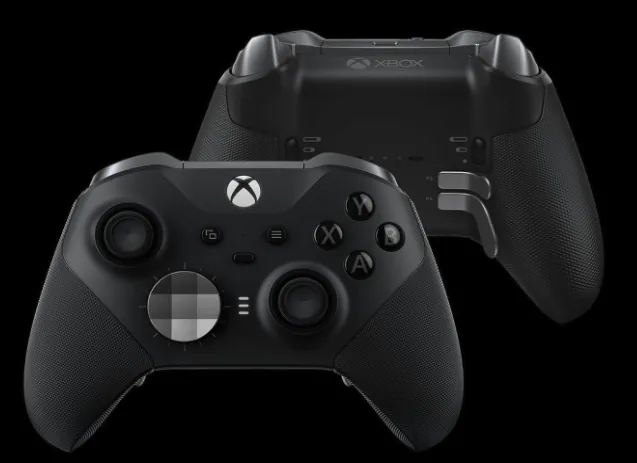
The rear controls reveal a clearer design split. SteelSeries builds four fixed, contoured buttons into the Aeon, so they remain stable and cannot be lost. Anyone prone to accidental rear presses must remap or disable them rather than taking them off. Microsoft’s four removable magnetic paddles make it possible to change the layout or use fewer paddles.
SteelSeries also advertises 18 mechanical switches across the Aeon’s inputs. Mechanical construction can produce a sharper click, but that specification does not guarantee that every button will feel better to every player. In a brief PC Gamer hands-on, the writer liked the grips and overall comfort but noticed some pre-travel and softness in the ABXY buttons. That is one reviewer’s observation, not a universal defect.
There is not enough directly comparable testing here to award either controller a latency advantage. The useful difference is physical: Aeon favors fixed controls and click-focused hardware, while Elite allows more parts to be removed or adjusted.
The OLED matters only if you change settings often
The screen belongs to the controller, not the dock. It can show battery information, select a connected device, choose profiles, remap supported buttons, and expose common adjustments without requiring another screen. Deeper tuning, including sensitivity, deadzone, and trigger calibration, runs through SteelSeries GG on a Windows PC.
That split makes the OLED helpful for quick changes between games. A player who uses separate rear-button layouts for a shooter and an action RPG can confirm the active profile from the controller instead of opening desktop software. It is also useful when the Xbox is active and the PC app is not in front of the player.
The Elite Series 2 has no display, but it keeps four onboard slots: three custom configurations and one default layout. Its profile button cycles through the saved options, while the Xbox Accessories app handles mapping and tuning on Xbox consoles or Windows. Once set up, changing layouts is fast even without a screen.
Frequent tinkerers gain more from SteelSeries’ immediate feedback. Players who configure a few profiles once and leave them alone are unlikely to justify the premium through an OLED by itself.
Compatibility depends on where you configure it
Both controllers cover Xbox Series X|S, Xbox One, and Windows PCs. Each also supports compatible mobile devices through Bluetooth, although mobile use is secondary to this comparison. Neither is a sensible purchase for native PlayStation 5 play.
Connection support is only part of the setup. The Aeon’s headline workflow requires USB connections from both nearby systems to its dock. Advanced configuration relies on SteelSeries GG for Windows, so a console-only owner will not have the same access to deep tuning. Useful everyday actions remain available through the onboard OLED.
The Elite connects to Xbox through Xbox Wireless or its cable and to supported PCs and mobile devices through Bluetooth or USB-C. Its Xbox Accessories app runs on Xbox consoles and Windows, giving console-only players access to button mapping, stick curves, trigger settings, and profile management without borrowing a PC.
Before buying the Aeon, check the desk rather than only the compatibility list: confirm that the dock can reach both systems and that there are USB connections available. That physical requirement decides whether its signature feature feels effortless or awkward.
Who should buy each controller?
| Buy the Aeon Pro if… | Buy the Elite Series 2 if… |
|---|---|
| Your PC and Xbox share one desk or entertainment area, and you use both regularly. | One platform accounts for most of your playtime. |
| You prefer exchanging a charged pack to tethering the controller mid-session. | You prefer a long internal-battery rating and occasional charging. |
| Contactless stick sensing matters more to you than adjustable resistance. | You actively use different thumbstick tension settings. |
| You change mappings often enough to benefit from visual confirmation on the controller. | A few saved profiles cover your games. |
| Fixed rear controls suit your grip and you accept the higher price. | You want to remove, rearrange, or reduce the number of rear paddles. |
| The controller will stay near its dock most of the time. | You want a complete accessory bundle and carrying case for travel. |
The Aeon’s poor-fit buyer is easy to identify: someone who uses one system, rarely edits a profile, and would treat the QuickSwitch dock as an ordinary charger. The Elite’s compromises become more noticeable for a dual-system player who repeatedly changes connections or dislikes plugging in an internal-battery controller.
Is the SteelSeries Aeon Pro worth it?
Yes, but for a narrow and recognizable setup. The Aeon Pro is worth considering when a gaming PC and Xbox sit close together, both receive regular use, and the owner will benefit from QuickSwitch every week. Its charged-spare workflow, Hall-effect sensors, fixed rear controls, and onboard settings then work as one coherent convenience package rather than a collection of unused extras.
For most single-platform players, the Elite Series 2 remains the better value. It preserves the premium-controller essentials, offers a much longer per-charge rating, lets the user adjust stick tension, and includes removable paddles plus a carrying case. Paying extra makes little sense when the Aeon’s dock would remain connected to only one device.
The choice is not about which controller has the longer feature list. It is about whether the Aeon removes friction from the way your equipment is already arranged. If you frequently switch between a nearby PC and Xbox, buy the Aeon Pro. If that sentence does not describe your setup, buy the complete Elite Series 2.
As an Amazon Associate, Gaming Chill earns from qualifying purchases. This does not affect the price you pay or what we recommend. Full disclosure